Stay two steps ahead on every sales call.
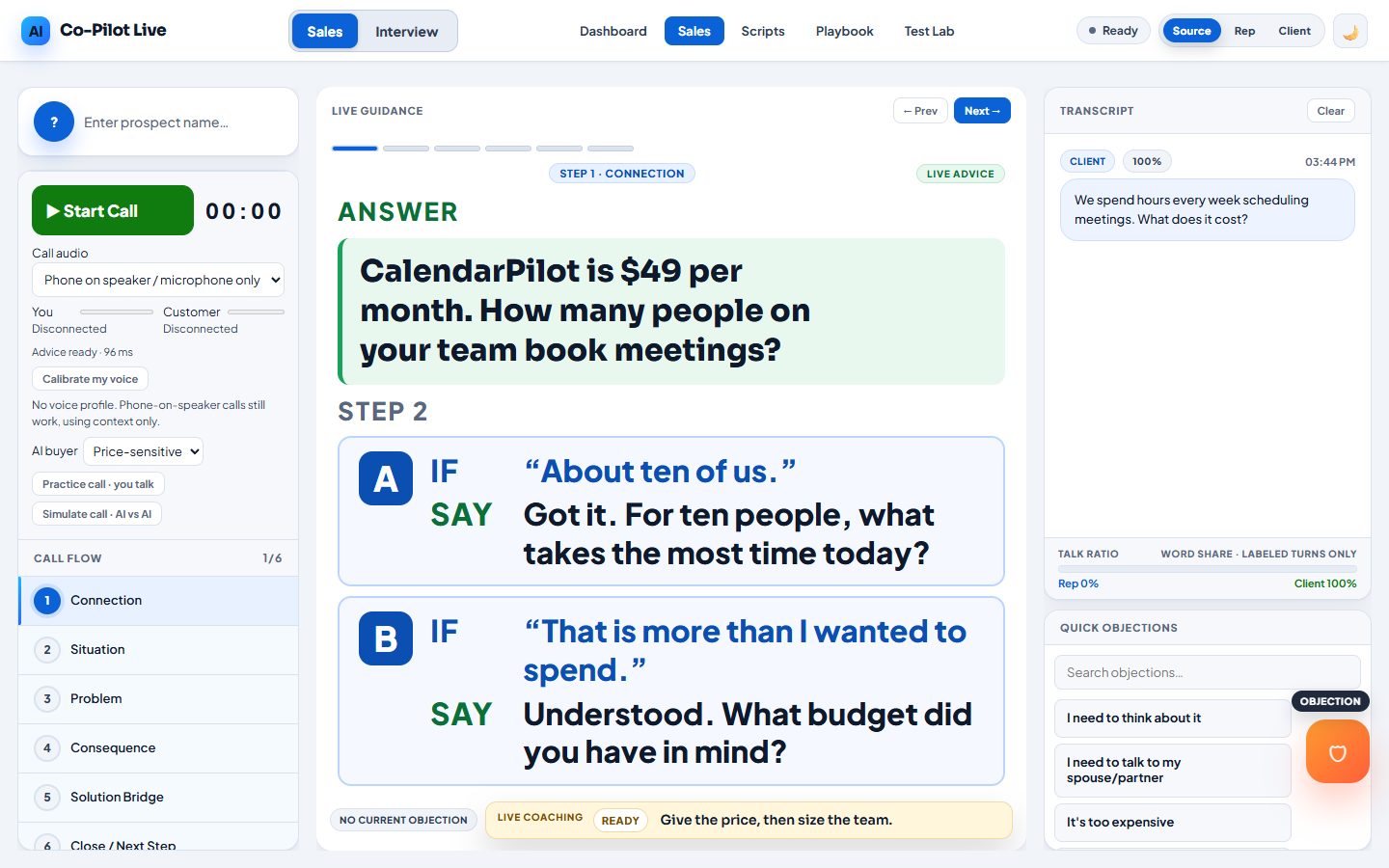
Sales Coach listens to your live call in Chrome and shows what to say now, in very large letters. Under it: the two replies the buyer will most likely give next, each with your answer already written.
Start free10 free minutes. Pay per minute. No subscription. Interviewing? See Interview Coach
Try it now. No account needed.
Type something a buyer might say. See what the coach would put on your screen. This demo sells a made-up product, so you can judge the answers.
Use it on every kind of sales call
Works in Chrome on a computer. Nothing to install. Sign in with email and password.
How it works in three steps
1. Add your facts and prices
Write your playbook once: what you sell, what it costs and what you can say about it. You approve every fact.
2. Put the call on speaker
Set the phone on speaker next to your computer, or share the browser tab the call is in. Sales Coach listens in Chrome.
3. Read the answer
When the buyer stops talking, your answer appears in big bold letters, with the next two replies ready below it.
Three things, big and bold.
- ANSWERWhat to say now, in very large letters. The first words show up while the rest is still being written.
- STEP 2 · AThe reply the buyer will most likely give next, with your answer to it already written.
- STEP 2 · BThe second likely reply, also with its answer. You stay two steps ahead.
Practice with an AI buyer
An AI buyer talks through your speakers and you answer out loud, the way you would on a real call. Pick the kind of buyer you want.
It only says what you approved.
Answers use only the facts and prices in your playbook. Sales Coach does not invent prices, guarantees or proof, so you never promise something you can’t keep.
Start freeUses
- Facts you approved
- Prices you approved
Does not invent
- Prices
- Guarantees
- Proof
After every call, a summary written for you.
When the call ends, your summary is written automatically and saved under My calls, next to the full transcript. You type nothing.
Every summary has:
- How it went, in one sentence
- The outcome and what was agreed
- What went well: up to three points
- What to do better: up to three moments, each with a better line you could have said
- Next steps for you
- A ready follow-up email to the buyer, with a Copy button
It also shows how much of the talking you did and how many questions you asked. Only you can see your calls. Download any of them, or delete them, at any time.
Your answers, on top of the call.
The free Chrome extension shows your answer in a see-through panel over your Google Meet or Zoom call, so your eyes stay on the other person.
Minute packs. No subscription.
New accounts start with 10 free minutes. Minutes work for both sales calls and interviews and never expire.
Payments by Square.
Try it on your next sales call.
Add your facts and prices, put the call on speaker and read the answer.